Beancount Export
Using Instabooks Beancount Export, you can download a company's entire QuickBooks Online books as a single Beancount file: the chart of accounts, and every transaction of every type, expressed as ordinary Beancount transactions with postings. The file reflects the books as Instabooks has them synced from QuickBooks Online, the same data the rest of Instabooks shows.
We've distilled the many QuickBooks Online transaction types into
one uniform double-entry model, and the export loads cleanly:
bean-check passes, and every account's balance in
Beancount matches its balance in QuickBooks Online.
Download the file
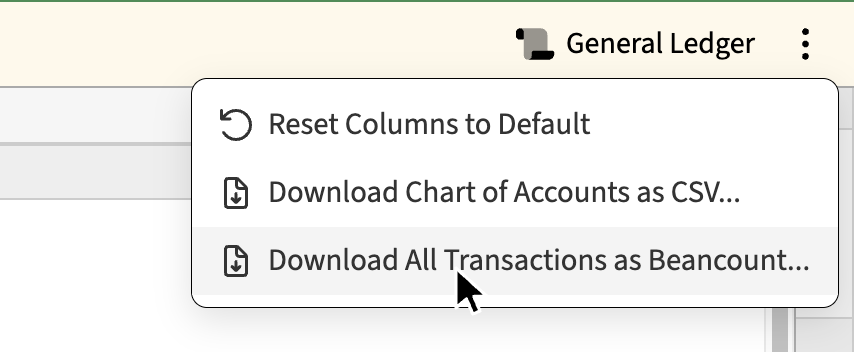
Open the company in Instabooks and go to the Chart of Accounts. Click the ⋮ More Actions menu in the action bar at the top right, then Download All Transactions as Beancount….
Chrome asks where to save the file. Other browsers save it to your
downloads folder as transactions.beancount.
Then check it:
bean-check transactions.beancountA clean run prints nothing. The export is tested with Beancount 3.
What's in the file
The file opens with a comment recording the company, the sync
version, and when Instabooks last synced from QuickBooks Online,
followed by the title and
operating_currency options and a
commodity directive for each currency the books use.
Accounts
Every QuickBooks Online account becomes one open
directive, dated to the account's first transaction. Accounts with
no transactions open on 1900-01-01. Each carries the
QuickBooks Online account id as qbo_id metadata, and
the account number as qbo_num when the account has
one.
Accounts that are inactive in QuickBooks Online get a
close directive dated to their last transaction, so
Beancount enforces the same rule QuickBooks Online does: nothing
can post to them.
2024-01-16 open Expenses:Legal-Professional-Services:Legal USD
  qbo_id: "Account.100"
  qbo_num: "6032"

1900-01-01 open Expenses:Office-expenses:Merchant-account-fees USD
  qbo_id: "Account.103"
1900-01-01 close Expenses:Office-expenses:Merchant-account-fees
Account names follow the QuickBooks Online hierarchy, with each level as one Beancount component. Characters Beancount does not allow in account names, such as spaces, parentheses, and ampersands, become dashes. Letters outside ASCII are kept.
Transactions
Every QuickBooks Online transaction, whatever its type, becomes one Beancount transaction:
- The payee is the transaction's vendor or customer.
-
The narration is the transaction's memo. Line
memos that differ from it appear as a
noteon their posting. - The class becomes a tag.
-
qbo_idmetadata holds the QuickBooks Online transaction type and id, such asPurchase.1171orInvoice.88. -
Each posting is one QuickBooks Online transaction line, posted to
its account. The location (department) appears
as
deptmetadata on the posting.
2024-09-18 * "Acme Staffing" "1 month of recruiting services" #Consulting
  qbo_id: "Bill.412"
  Liabilities:Accounts-Payable-A-P -5000.00 USD
  Expenses:Contractors 5000.00 USD
    dept: "Boston"
Multi-currency transactions
A transaction in a foreign currency has postings in that currency
and postings in the home currency. Each foreign-currency posting
carries an @ price in the home currency, computed
from the transaction's own amounts, so the transaction balances
exactly as QuickBooks Online recorded it.
2024-09-18 * "Harbor Analytics Ltd" ""
  qbo_id: "Payment.2093"
  Assets:Checking 61292.22 USD
  Assets:Accounts-Receivable-GBP -46866.66 GBP @ 1.30780004378379001192 USD
When QuickBooks Online doesn't balance
Occasionally a transaction's lines in QuickBooks Online do not sum
to zero, usually by a cent. The export keeps every line as
recorded, flags the transaction with !, and adds a
posting to Equity:QBO-Discrepancies for the
difference. The balance of that account is the total of
QuickBooks Online's own rounding.
A voided transaction stays in QuickBooks Online with every amount
set to zero, and it stays in the export the same way, marked with
zero_amount: TRUE metadata so you can filter it out.
Working with the file
The metadata is there to be queried. In bean-query,
transaction metadata is read with entry_meta:
SELECT date, narration, account, position
WHERE entry_meta("qbo_id") = "Invoice.88";

SELECT count(*) WHERE entry_meta("zero_amount");
Because the file is a complete, balanced ledger, it works as an
include from a ledger of your own, where you can add
balance assertions, pad directives, and
price history alongside it.
Re-exporting
Each download is a complete snapshot of the books at that moment. To pick up new activity, download again. The sync version in the file's header increases with every change synced from QuickBooks Online, so it tells you which of two exports is newer.